
Google Ads for Doctors in Canada
In the competitive digital landscape of Canada, Google ads for doctors in Canada is not simply an option anymore — it’s a necessity. As more patients initiate their search for healthcare services online, medical practices need strategic and compliant Google Ads campaigns to reach their target audience effectively. This article explains how doctors can build, optimize, and manage Google Ads campaigns that generate real patient leads, while staying within healthcare advertising policies.
We will cover:
- What makes Google Ads effective for doctors
- How to target doctors on Google Ads (and patients)
- Best Google Ads strategies for doctors in Canada
- Local targeting, compliance and campaign optimization
- Budget planning, KPI tracking, and landing page tips
- Lead-first strategy
-
Clear reporting
- Tracking setup
Why Google Ads Matter for Medical Practices in Canada
In today’s healthcare marketplace, patients increasingly turn to search engines like Google to find medical services — whether it’s family physicians, specialists, or dental practitioners. Google ads for doctors in Canada provide a direct path to these users right when they are searching, often intent on booking appointments.
Key Benefits of Google Ads for Doctors
- Immediate Visibility: Ads appear at the top of search results, giving doctors prime digital real estate.
- Targeted Reach: Ads can target based on location, intent, keywords, and even device type.
- Cost Control: Pay‑per‑click (PPC) ensures you only pay when someone clicks your ad.
- Trackable Performance: With conversion tracking, you can measure calls, form submissions, and bookings.
- Flexible Budgets: Doctors can run campaigns with daily budgets that fit their practice size.
Understanding Canadian Healthcare Ad Regulations
Before building campaigns, it’s crucial to understand that healthcare advertising in Canada involves both Google policies and provincial regulations. Google requires specific verification for healthcare advertisers, and content promoting unproven treatments or prescription drugs is often restricted.
Important Compliance Rules for Doctors’ Ads:
- Healthcare providers often need to complete a Google advertiser verification process.
- Ads must be informative and evidence‑based — no unrealistic claims or guaranteed outcomes.
- You cannot target users based on specific medical conditions in a discriminatory way.
- Landing pages must be trustworthy, transparent, and accurate, with clear contact information.
Not sure where your ads are leaking money?
We’ll send an audit summary + quick-win plan.
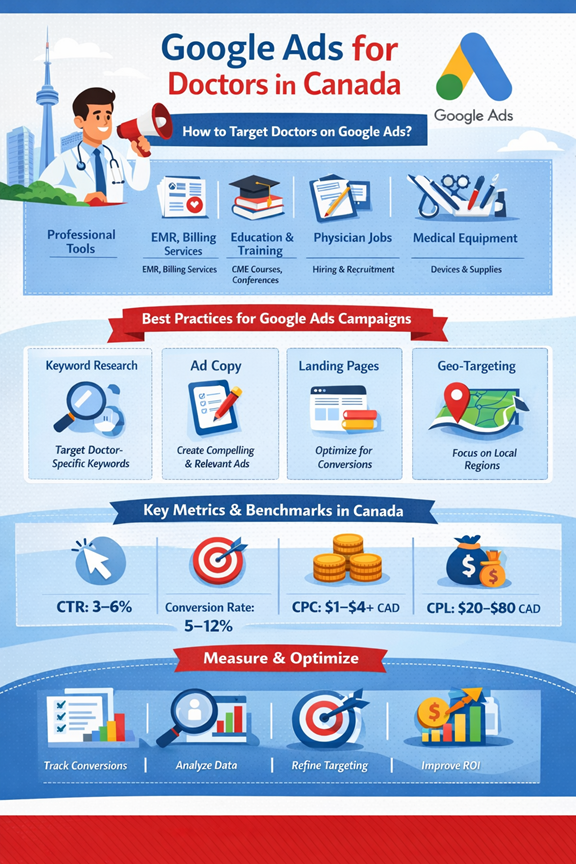
How to Target Doctors on Google Ads?
Although most doctors advertise to attract patients, you may sometimes want to target doctors themselves — for recruitment, professional referrals, or selling B2B services (e.g., medical software). Google Ads doesn’t allow direct profession‑based targeting like “only doctors,” but you can approximate this using keyword and audience strategies:
Use Business and Professional Keywords
Rather than generic medical terms, use keywords that signal professional intent. Examples include:
- “medical practice management software Canada”
- “clinic staffing solutions Canada”
- “continuing medical education courses for doctors”
These keywords indicate professional rather than patient search intent.
Leverage Custom Intent Audiences
Google Ads allows advertisers to create Custom Intent Audiences by targeting users who have previously searched for specific professional phrases related to healthcare operations and management.
Example phrases for Custom Intent:
- “hospital billing software demo”
- “clinic workflow solutions Canada”
- “medical billing services for doctors”
This method helps your ad show to users most likely interested in B2B medical services.
Location Targeting + Industry Keywords
When combined with geography (e.g., Toronto, Vancouver, Calgary), phrases like “medical clinic marketing services Toronto” can help you get in front of professionals in specific metropolitan areas.
Remarketing to Industry Visitors
If you have a landing page geared toward doctors, you can use remarketing tags to show ads to past visitors who didn’t convert — keeping your brand top of mind.
Exclude Irrelevant Audiences
Use negative keywords to eliminate general patient search terms and focus spend on professional traffic — this sharpens your campaign’s ROI.
Keyword Category | Example Keywords | Intent Type |
Professional Tools | “clinic management software Canada”, “medical billing services” | B2B / Doctor-focused |
Education & Training | “CME courses for doctors”, “medical conferences Canada” | Professional Growth |
Recruitment / Hiring | “physician jobs Canada”, “medical staffing services” | Career / Hiring |
Equipment & Supplies | “medical devices Canada”, “surgical equipment suppliers” | B2B / Purchase Intent |
Simple Pricing, No hidden fees.
Use these as placeholders, Update pricing to your exact offer.
Starter
For monthly ad spend under $1,000-
Google Search Ads management (single campaign)
-
High-intent keyword research
-
Ad copy creation (basic A/B testing)
-
Weekly bid & budget optimization
-
Negative keyword setup & maintenance
-
Monthly performance report (leads, CPA, spend)
Growth
For monthly ad spend between $1,000 – $2,000-
Everything in Starter, PLUS:
-
Multiple search campaigns & ad group structuring
-
Advanced keyword research & intent segmentation
-
Ad extensions setup & optimization
-
Conversion tracking setup (GA4 + Google Ads)
-
Weekly performance optimization & scaling actions
Scale
For monthly ad spend over $2,000-
Everything in Growth, PLUS:
-
Performance Max campaign management
-
Full-funnel strategy (search + remarketing)
-
ROAS & CPA focused bidding strategies
-
Landing page alignment & conversion rate optimization
-
Priority support + bi-weekly performance reviews
Best Google Ads for Doctors in Canada
When building Google Ads campaigns tailored for Canadian medical practices, certain strategies consistently outperform others. These include: search campaigns, location extensions, ad extensions, and locally targeted landing pages.
Search Ads — The Backbone of Doctor PPC
Search Ads are text ads that appear in Google search results when someone types a relevant query. This is often the most effective type of Google ads for doctors in Canada.
Example Search Ad Structure:
Component | Purpose |
Headline 1 | “Best Family Doctor in Toronto” |
Headline 2 | “Book Your Appointment Today” |
Description | “Experienced medical care. Accepting new patients. Call Now.” |
Call Extension | Click‑to‑call button for mobile |
Location Extension | Clinic address & map link |
Search Ads are powerful because they target active searchers — people already looking for healthcare services.
Location & Call Extensions
Add location extensions so your practice’s address appears with the ad. Call extensions enable users to call directly from search results — crucial for mobile users.
Geo‑Targeting by City or Radius
Geo‑targeting enables your ads to show only within your service area — essential for local clinics and specialists. For example, a dentist in Calgary can target a 5–10 km radius around the clinic to maximize relevance.
Negative Keywords Optimization
Add negative keywords such as “free,” “jobs,” or unrelated conditions (e.g., “doctor salary”) to avoid wasting spend on low‑quality clicks.
Setting Up High‑Performing Google Ads Campaigns
Below is a defined roadmap for setting up Google Ads that perform well for doctors:
Step 1: Keyword Research
Start with keywords that reflect patient intent — for example:
- “urgent care clinic near me”
- “pediatrician accepting new patients”
- “orthopedic surgeon in Vancouver”
Use Google’s Keyword Planner to find high‑intent, low‑competition phrases.
Step 2: Ad Copy that Converts
Good ad copy should be:
- Relevant to the searcher’s needs
- Clear about your services
- Include a call to action (CTA) such as “Book Now”, “Call Today”
Step 3: Landing Page Optimization
Your landing page should:
- Load quickly
- Include clear contact info
- Have a simple booking / contact form
- Reflect the ad’s message for better Quality Score
Step 4: Set Your Budget and Bids
Start with a conservative daily budget and monitor performance:
- Use manual bidding early to control CPC
- Adjust bids for devices or times of day with higher performance
In Canada, cost‑per‑click for service keywords in healthcare generally ranges from $1 to $4+ CAD depending on competition.
Step 5: Track Conversions
Set up conversion tracking — calls, form submissions, appointment bookings — to measure ROI and optimize over time.
Local Targeting Strategies
Local awareness is crucial for Google ads for doctors in Canada:
Geo‑Fencing
Use radius targeting around your clinic or hospital location to show ads only to nearby users.
Example:
- 5–10 km radius around Toronto downtown for a cardiologist
- City‑wide targeting for large hospital groups
Sitelink & Location Extensions
Extensions make your ad more interactive — users see more ways to connect with you (directions, call button, website links).
Budgeting and Pricing Models
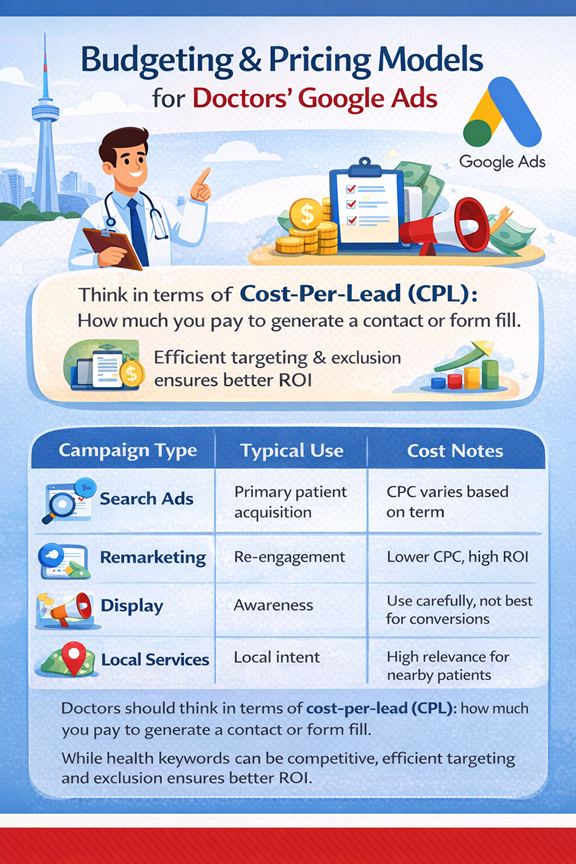
Doctors should think in terms of cost‑per‑lead (CPL): how much you pay to generate a contact or form fill. While health keywords can be competitive, efficient targeting and exclusion ensures better ROI.
Campaign Type | Typical Use | Cost Notes |
Search Ads | Primary patient acquisition | CPC varies based on term |
Remarketing | Re‑engagement | Lower CPC, high ROI |
Display | Awareness | Use carefully, not best for conversions |
Local Services | Local intent | High relevance for nearby patients |
Common Google Ads Mistakes to Avoid
- Targeting too broad regions
- Not using negative keywords
- Ignoring mobile optimization
- Focusing on clicks over conversions
- Poor landing pages
Measuring Success of KPIs for Doctors
Key Performance Indicators (KPIs):
- Conversion rate
- Cost per lead (CPL)
- Click‑through rate (CTR)
- Phone calls & bookings
- Quality Score
Metric | Average Benchmark (Canada) | Tips for Improvement |
Click-Through Rate (CTR) | 3–6% | Use precise keywords, compelling headlines |
Conversion Rate | 5–12% | Optimize landing pages, clear CTA, fast load time |
Cost Per Click (CPC) | $1–$4+ CAD | Use geo-targeting & negative keywords to reduce CPC |
Quality Score | 7–10 | Ensure ad relevance, keyword alignment, and landing page quality |
Cost Per Lead (CPL) | $20–$80 CAD | Track conversions and refine audience targeting |
Frequently Asked Questions (FAQ)
What are the benefits of using Google Ads for doctors in Canada?
Google Ads help doctors reach patients at the exact moment they are searching for healthcare services. Benefits include immediate visibility, precise targeting by location and keywords, cost control with pay-per-click, measurable conversions, and flexible budgets.
How to target doctors on Google Ads?
While Google Ads doesn’t allow direct targeting by profession, you can reach doctors through custom intent audiences, professional keywords, B2B search terms, and remarketing campaigns focused on healthcare software, clinic management, or medical education services.
What is the average cost of Google Ads for doctors in Canada?
Costs vary depending on competition and keywords. CPC (cost-per-click) for healthcare search terms generally ranges from $1 to $4+ CAD. Effective targeting, negative keywords, and local optimization help maximize ROI while controlling costs.
What type of Google Ads works best for doctors in Canada?
Search Ads are the most effective, especially when combined with location extensions, call extensions, and geo-targeted campaigns. Remarketing and locally targeted Display Ads can also help with patient retention and awareness.
How can doctors measure the success of their Google Ads campaigns?
Key metrics include conversion rate, cost per lead (CPL), click-through rate (CTR), number of calls and appointment bookings, and Quality Score. Using Google Ads conversion tracking ensures campaigns are data-driven and optimized for results.
Get a free audit (action plan included)
Tell us about your business and we’ll reply with a clear next-step plan.
Phone Number:
+1-709-771-0328
Email:
Info@nexads.ca
Location:
St.John's, NL, Canada
Request your audit
We reply within 24 hours (business days).